
A good pain cave puts three things where you need them: the ride screen at eye level, cool air on your chest, and your bottle, towel and phone within reach. There are three common ways to do it. A TV gives you the biggest, easiest-to-read screen. A laptop on a trainer desk keeps the screen and keyboard right in front of you. A tray on your bike computer mount puts your phone, towel and a gel at your fingertips and needs no extra furniture. Many riders end up combining two of them.
None of these needs a dedicated room. A corner of the garage, the spare bedroom or the end of the living room works, as long as the bike can stay set up. A bike that’s ready to ride gets ridden.
What every pain cave needs first
Whichever screen setup you choose, start with these. They matter more than the screen.
- A fan aimed at your chest and face. In a study of 16 recreational riders, a fan (about 4 m/s of airflow) let them hold 15% more power for 40 minutes at the same effort, and they felt cooler doing it (Fernandez et al., 2023). If you can, put it off to one side so it doesn’t block your view.
- A mat under the trainer. It protects the floor from sweat, steadies the trainer and cuts vibration noise for anyone below you.
- A towel and a bottle you can reach without stopping. You sweat more indoors than you expect.
- A level bike. Set the trainer on flat floor and level the bike front to back.
If you’re still choosing a trainer, Indoor Cycling Training for Beginners covers trainer types, sensors and your first four weeks.
Setup 1: a TV at eye level
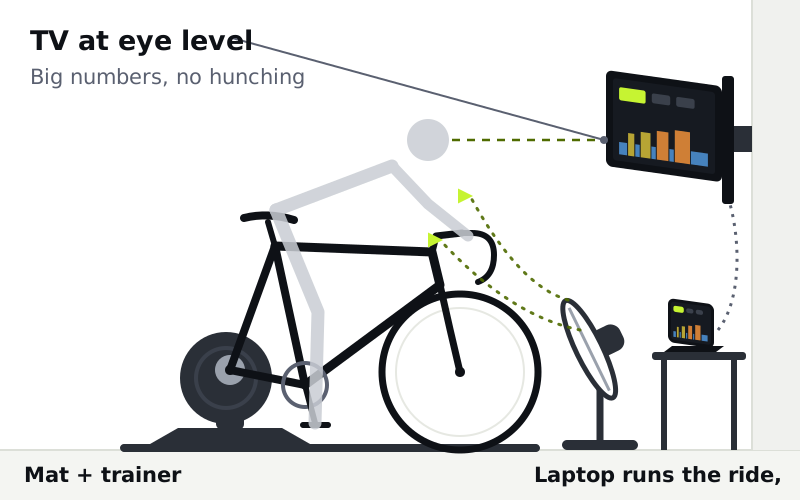
A TV is the most comfortable screen for long rides. The numbers are big enough to read without leaning in, so your head stays up and your neck and shoulders stay relaxed through a 90-minute endurance ride.
How to set it up
- Mount or stand the TV straight ahead, with its center at your eye line when you’re riding on the hoods. Wall mounts work well, and a TV on a low stand can be raised on a shelf.
- Run WattAscent on a laptop and connect it to the TV with an HDMI cable. The laptop pairs with your trainer and sensors over Bluetooth; the TV just shows the screen. A cable is the simplest, most reliable link.
- Keep the laptop near the trainer, on a small table or shelf in front of the bike, so the Bluetooth connection stays strong.
- Put the fan low and to one side, angled up at your chest, so it cools you without blocking the screen.
Good to know: smart TVs and streaming boxes can’t connect to your trainer, so you’ll still need a laptop (or an Android phone or tablet) to run the ride. And you’ll get off the bike to change anything on the laptop, so set up your workout before you clip in.
Best for: long endurance rides, riders who already own a TV in the training space, and anyone who finds a small screen tiring to watch.
Setup 2: a laptop on a trainer desk
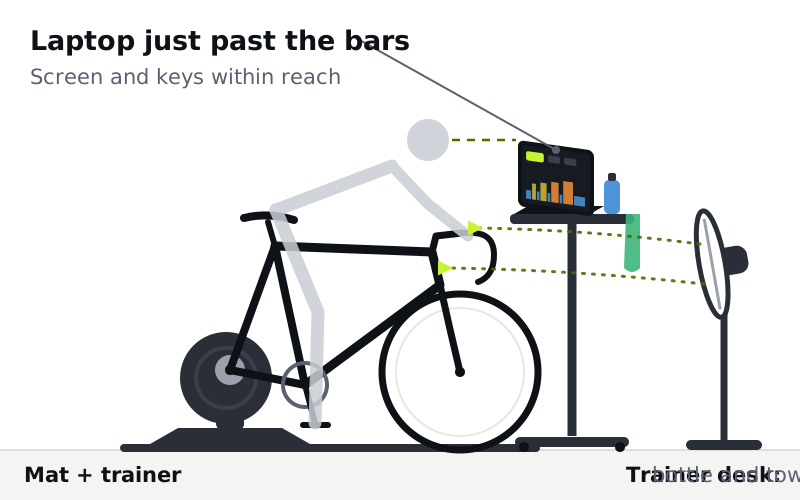
A laptop on a trainer desk is the most hands-on setup. The screen, keyboard and trackpad are within reach, so you can pause, skip an interval or adjust the effort without getting off the bike.
How to set it up
- Use a height-adjustable trainer desk or a sturdy standing desk placed just past your handlebars. Raise it until the top of the laptop screen is close to your eye line.
- Tilt the screen back so you look at it, not down at it. A laptop that sits too low pulls your head and shoulders into a hunch.
- Keep the desk clear of your knees and hands when you’re out of the saddle, and make sure it doesn’t wobble when you lean on it.
- Use the desk for your bottle, towel and snacks too. A desk on wheels rolls out of the way when you’re done.
Good to know: sweat drips forward, so keep a towel over the keyboard edge and wipe the laptop down after each ride. And keep the fan behind or beside the desk, aimed over it at your chest.
Best for: small spaces without a TV, riders who like to adjust workouts mid-ride, and anyone who wants one device for everything.
Setup 3: a tray on your bike computer mount
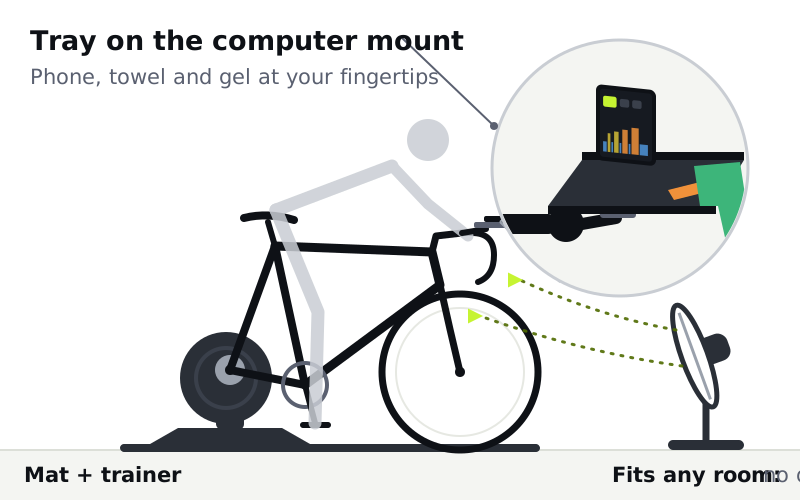
Your bike computer mount sits empty when you ride indoors. A trainer tray clips into it and gives you a small shelf right in front of your hands: room for your phone running the ride, a towel and a gel, with no desk or stand on the floor.
For example, the JetBlack Trainer Tray ($49) locks into an existing Garmin or Wahoo quarter-turn mount, and the mount isn’t included (JetBlack via Zwift, 2026). Foothill’s Trainer Tray is an 8 × 6 inch (20 × 15 cm) aluminum tray with upturned edges and a grippy pad that clips into your GPS mount the same way (Bikerumor, 2021).
How to set it up
- Check your mount first. Trays fit the out-front style of mount that extends in front of the bars, in Garmin or Wahoo style. If yours is a stem-top mount, you may need an out-front mount as well.
- Keep it light. A phone, a towel, a gel and a remote are fine. Don’t load the tray with anything heavy, since the out-front mount carries the weight (Bikerumor, 2021).
- Protect the phone from sweat. You’re leaning right over it. Keep the towel on the tray and wipe the phone after the ride.
- Turn on audio cues. A phone is a small screen to follow for an hour. WattAscent’s virtual coach, Coach Watson, can read its cues aloud, so you can look up and still know what’s coming.
Good to know: WattAscent runs in Chrome on Mac and Windows, and on Android phones and tablets with our app on Google Play. The iPhone and iPad app is coming soon.
Best for: tight spaces, riders who want everything within reach, and a phone or remote alongside a TV (see below).
Which pain cave setup should you choose?
We recommend starting with what you already own. If there’s a TV in your training space, use it. If there isn’t, a laptop on a desk is the most flexible. Add a tray when you get tired of reaching for your phone and towel.
| TV at eye level | Laptop on a trainer desk | Tray on the computer mount | |
|---|---|---|---|
| Screen size | Largest | Medium | Small (phone) |
| Change the workout mid-ride | No, unless you add a tray or desk | Yes, keyboard and trackpad in reach | Yes, on the phone |
| Extra gear | HDMI cable, TV mount or stand | Trainer desk or standing desk | Tray, out-front mount if you don’t have one |
| Floor space | Wall or stand in front | Desk in front | None beyond the bike |
| Watch out for | Fan blocking the view | Sweat on the keyboard | Sweat on the phone, small screen |
| Best for | Long rides | Hands-on control | Tight spaces |
Combine a TV and a tray
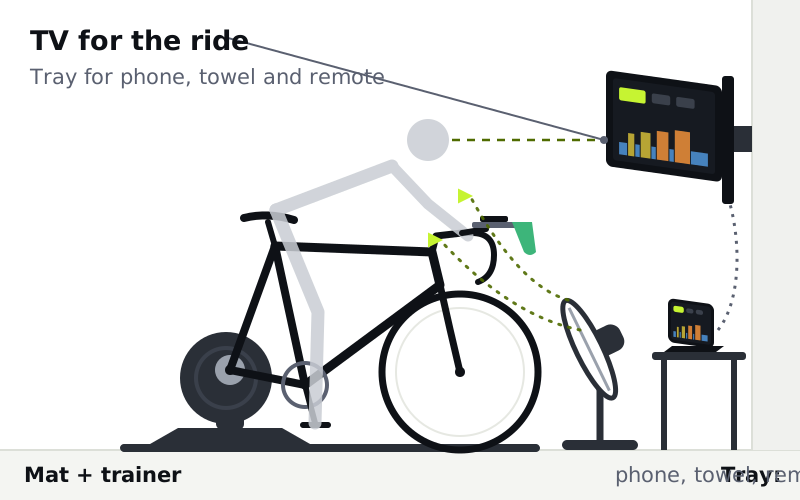
The setup many riders settle on is a TV for the ride screen plus a tray on the bars. The TV keeps your head up, and the tray keeps your phone, towel and TV remote in front of your hands, so you never need to stop mid-interval to grab something.
A laptop on a desk plus a tray works well too, especially if the desk is a little farther away than you’d like.
WattAscent in your pain cave
WattAscent builds your indoor training plan and controls your smart trainer through each workout in ERG mode, so whichever screen you choose, the trainer sets the effort and you just pedal. Coach Watson’s cues on pacing, cadence, breathing and fueling can be read aloud, which helps on a phone or when the screen is across the room. Adaptive FTP keeps your training zones current every two weeks from the rides you’re already doing.
WattAscent also includes a Bike Fitting Tool: film yourself on the trainer with your phone, and it measures your position and suggests small changes, such as saddle height, one at a time. An hour in one position indoors is when a small fit issue shows up, so your pain cave is the right place to check it.
WattAscent has a 7-day free trial, then it’s $35 a year. Start training.
Frequently asked questions
What is a pain cave?
A pain cave is cyclists’ slang for an indoor training space: the room or corner where your bike lives on the trainer. A good one has a fan, a mat, a screen at eye level and everything you need within reach, so you can start a ride in a couple of minutes.
Can I run my indoor training app on a smart TV?
Usually not directly. Smart TVs and streaming boxes can’t connect to your trainer, so run WattAscent on a laptop and connect it to the TV with an HDMI cable. The laptop handles the trainer connection and the TV shows the screen.
How high should my training screen be?
Put the center of the screen at your eye line when you’re riding on the hoods. A screen you look down at pulls your head and shoulders forward, which gets uncomfortable over a long ride.
Where should I put the fan?
In front of you, aimed at your chest and face, and off to one side if it would block your screen. Cool airflow lets you hold more power at the same effort, so the fan matters more than any other accessory.
Will a trainer tray fit my bike?
Most trainer trays clip into a Garmin or Wahoo quarter-turn out-front mount, the same mount your bike computer uses. Check which mount you have before you buy, and keep the tray’s load light.
Do I need a separate room for a pain cave?
No. A corner of the garage, a spare bedroom or one end of the living room works. What matters is that the bike can stay set up, with the fan and mat in place, so getting started takes a couple of minutes.
References
- Fernandez A, Wimer GS, Culver MN, Flatt AA, Grosicki GJ (2023). Fan cooling improves submaximal exercise capacity in an indoor thermoneutral environment. Research Quarterly for Exercise and Sport, 94(1):124–130. link
- Zwift (2026). JetBlack Trainer Tray, product page. link
- Bikerumor (2021). Foothill Trainer Tray clips in your GPS mount, holds phone & remote for indoor training. link